
The AI hype train has been running at full steam lately. Some companies are trying to ensure they don’t miss the plane, while others are capitalising on collective FOMO or showing off their newly earned “AI in [insert any profession]” certificate from an online course. But press them for specifics on how they’re actually implementing AI in their workflows? Suddenly, it’s all quiet on the innovation front.
In reality, AI benefits those who have already incorporated workflow optimization into their daily routines the most. They were quick to test ChatGPT, looking for ways to streamline their work and automate boring tasks (while also checking its joke-telling abilities, naturally). After all, if it’s not enjoyable, motivation disappears quickly.
The year 2024 was about exploring what else AI can do for us, besides speeding up workflows, and discovering new tools, testing them, and honing our prompting skills – which, as it turns out, is a skill in its own right.
Case in point: my quest to wrap my head around Piper diagrams from scratch and even create an app while I was at it. I started with a CSV file containing a table of water chemistry data (HCO3, CO3, SO4, Cl, Na, Ca, Mg, and K) for a dozen observation points.
Step one involved summoning the AI coding genies (Claude, Perplexity, ChatGPT, and the newcomer DeepSeek) and putting them to the test. The challenge? Conjuring up an R script for a dummy Piper diagram out of thin air. The results were… well, let’s just say our AI friends have vivid imaginations, dreaming up non-existent packages left and right. When pressed about it, they did their best using ggplot based on a definition of a Piper diagram. The winner was Claude, with the figure shown below. Yes, indeed – others were much worse.
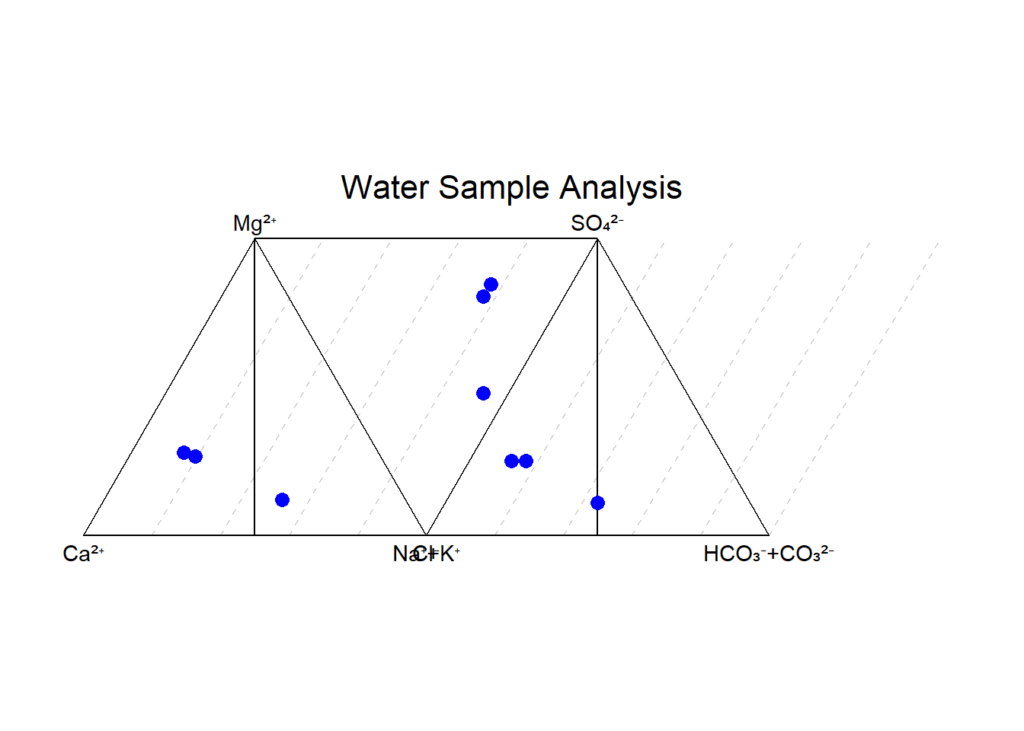

Initial Piper diagram made by Claude.ai (left) and the Piper plot after some training (right)
Undeterred, I fed Claude some starter code scrounged up from the depths of the internet (because let’s face it, there’s always someone out there who’s already tackled this). A few tweaks, some polishing later, and a passable ggplot emerged from the digital abyss.
Now, anyone with basic/intermediate coding skills can accomplish the above. Let’s see how far AI can take it into the realm of “would love to do that, but have no coding skills for it”. And when you have an AI sidekick ready to help you punch above your programming weight, I decided to go for the gold: my very first Shiny app.
First, I created a functioning app in Quarto with instructions to introduce sliders, a direct input cell, and some explanation about the Piper diagram. Then, I made the graph interactive using plotly. All was introduced one by one and tested, containing three-level loops using advanced syntax that I was barely able to read.
Then came the moment of truth: deploying this beast. A nightmare. It simply would not work. But after a deep dive into error logs and a lot of back-and-forth with my digital problem-solving partner, we emerged victorious. DeepSeek suggested cleaning up the code and simplifying it completely, reducing it from almost 600 lines to 400 lines. The frustrating part was when Claude would limit the output because the limit was reached, even though I have a paid version. DeepSeek replaced the complicated plotly function with some dummy 2-line code. It worked! Then, I slowly introduced the plot itself (this part is not advanced coding), played with a now completely ruined legend for a while, because nothing is really simple, and finally ended up with a Shiny new app to call my own (NB the source code is also available in the app).
https://qconsulting.shinyapps.io/piper-diagram/
The key takeaway from this? Wielding AI effectively is all about knowing exactly what you want and being fluent in the lingo of your tools. It’s not a magic wand (though it sure feels like it sometimes). For us mere mortals dipping our toes into the vast ocean of programming, AI can be a life raft, ferrying us a good 70% of the way to our destination, but you’d better be able to troubleshoot it, diagnose issues yourself, and play with the code.
But it’s still worth it because I can now create simple Shiny apps. Of course, one can add a map, several tabs, etc., but a small victory is needed to be that ambitious.
PS Fair warning: this article might not age well. In fact, I fully expect all these AI tools to level up their game in the blink of an eye, especially with new versions dropping left and right. But the core workflow? That’s not going anywhere.


